



Manabie
E-Learning App: Total Education

Introducing Manabie App

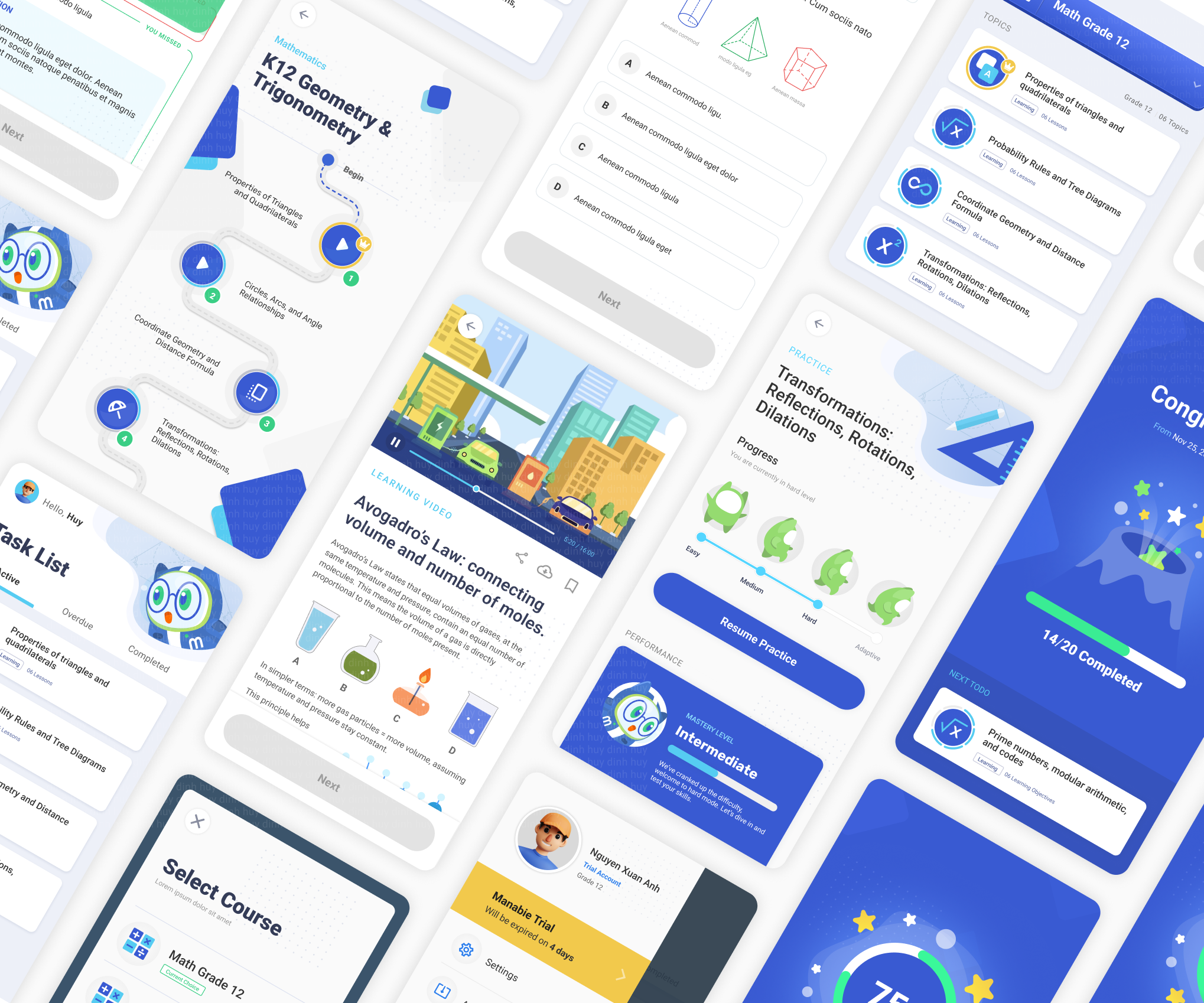
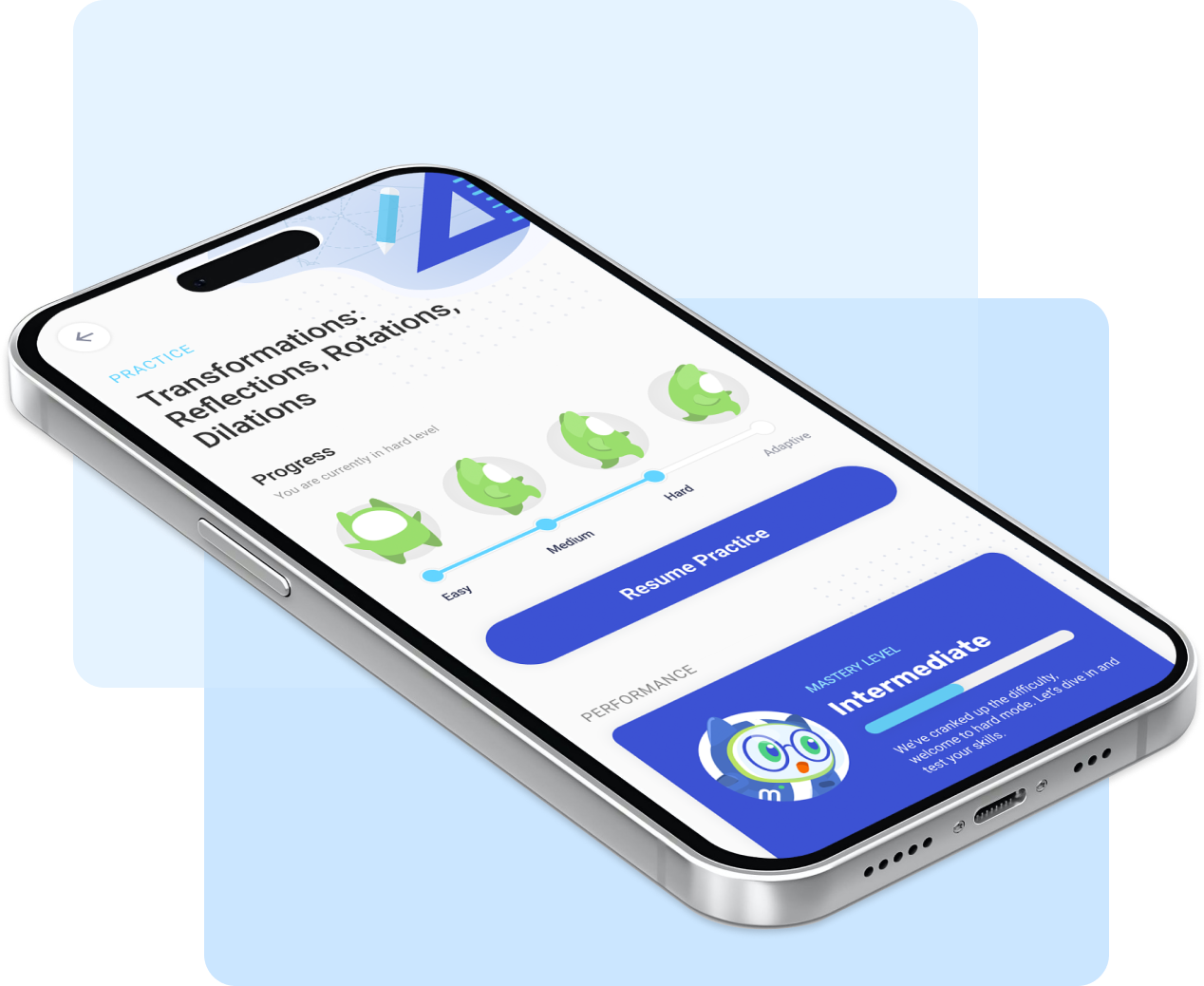
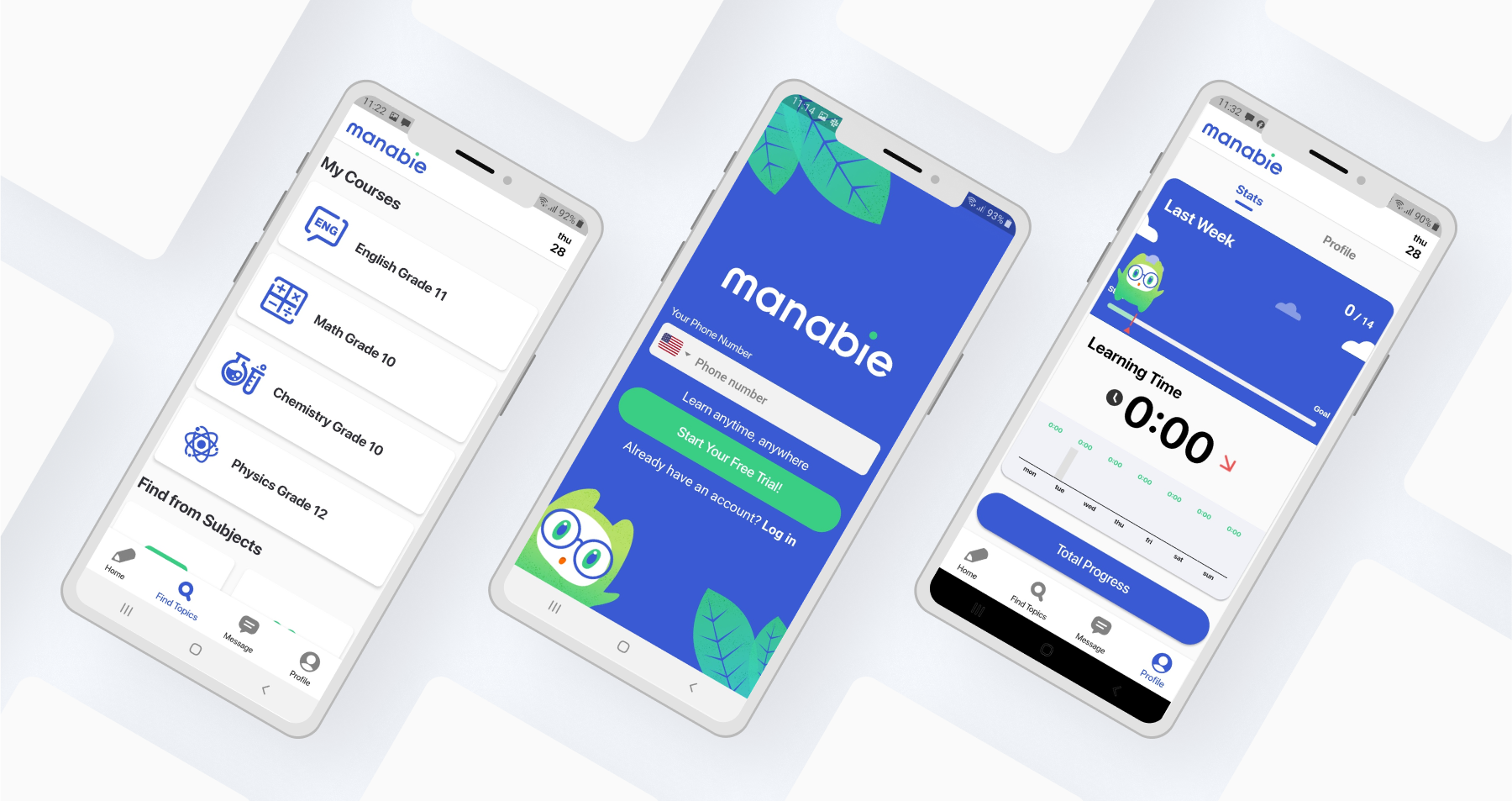
Manabie is an online learning service for high school students (G10-12) and university exam candidates. Manabie provides courses that are perfect for catching up with school lessons, studying ahead, or studying for school tests, mid-term exams, final exams, and university entrance exams, based on the concept of ‘Total Education’, as opposed to pure memorization.

Manabie’s lectures are delivered through short and engaging animated videos, and reinforced with comprehensive study guides, quizzes, and mock exams.

Commercial Video

This commercial video shows how to use Manabie to boost my academic performance—from exploring its top features to walking through each step in the app.

My Role

Role: Product Design Manager
I joined Manabie in 2019 as the 1st designer in the Vietnam office - all designs below are done by me.
Over the course of 2 years, I built and led a design team, growing it from 01 designer to a team of 06 designers by 2021.
Team Management
•  Mentor and guide a team of 6 product designers across Vietnam, Singapore, and Japan.
•  Oversee resource allocation to ensure project success.
Design & Strategy
•  Shape design vision to align with business and product goals.
•  Conduct user research to identify needs and pain points.
•  Create user flows, wireframes, and prototypes.
•  Develop a design system for consistency and scalability.
•  Measure success through user feedback and data.
Communication & Collaboration
•  Present design concepts to stakeholders.
•  Collaborate with product managers, engineers, and stakeholders to develop solutions.
•  Lead stakeholder meetings and ideation workshops.

Existing Product & Issues

When I joined Manabie in 2019, the mobile app was struggling—with high user drop-off, low engagement, and declining time spent on the platform. These issues negatively impacted the app's performance and overall user experience
High Abandonment Rate
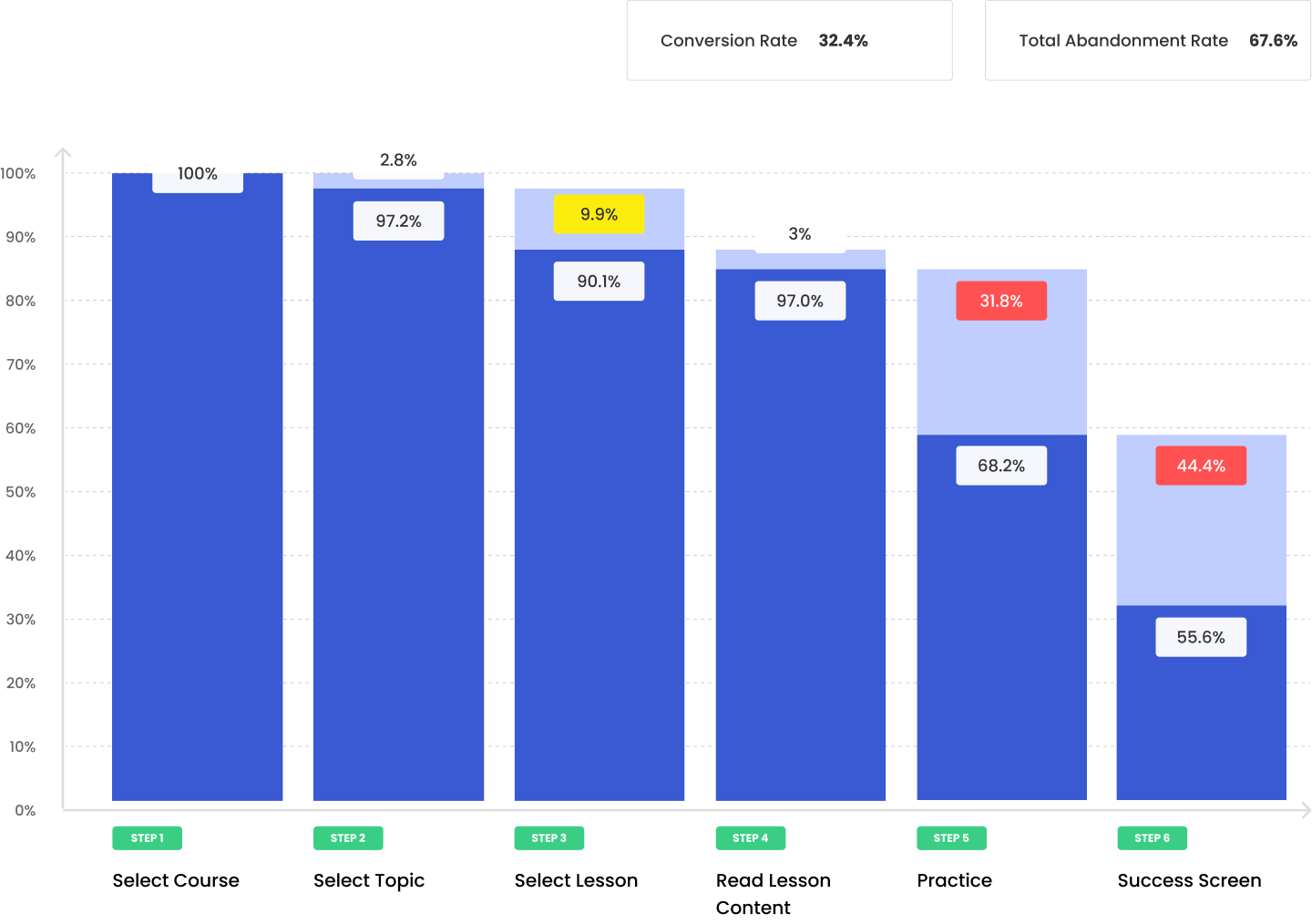
67.6% abandonment rate - Manabie Learning Journey
Manabie App was facing a high learning journey abandonment rate of 67.6%. Many learners find the journey either too difficult or lack the motivation to complete it. The consequence is students finish lessons without fully understanding.
Low Assignment Completion Rate
26% assignment completion rate
Manabie faced a low assignment completion rate, with only 26% of assignments being completed. Many students struggle to locate assignments, often forget about them, and show low engagement with the tasks.
Low User Interaction
Falling below industry benchmarks
Manabie struggled with low average time on the app, falling below industry benchmarks. Many students find the app lacks engaging content and fails to engage users effectively.

Understand The Product & Business Objectives

Method & Techniques
Stakeholder Meeting
Brainstorming
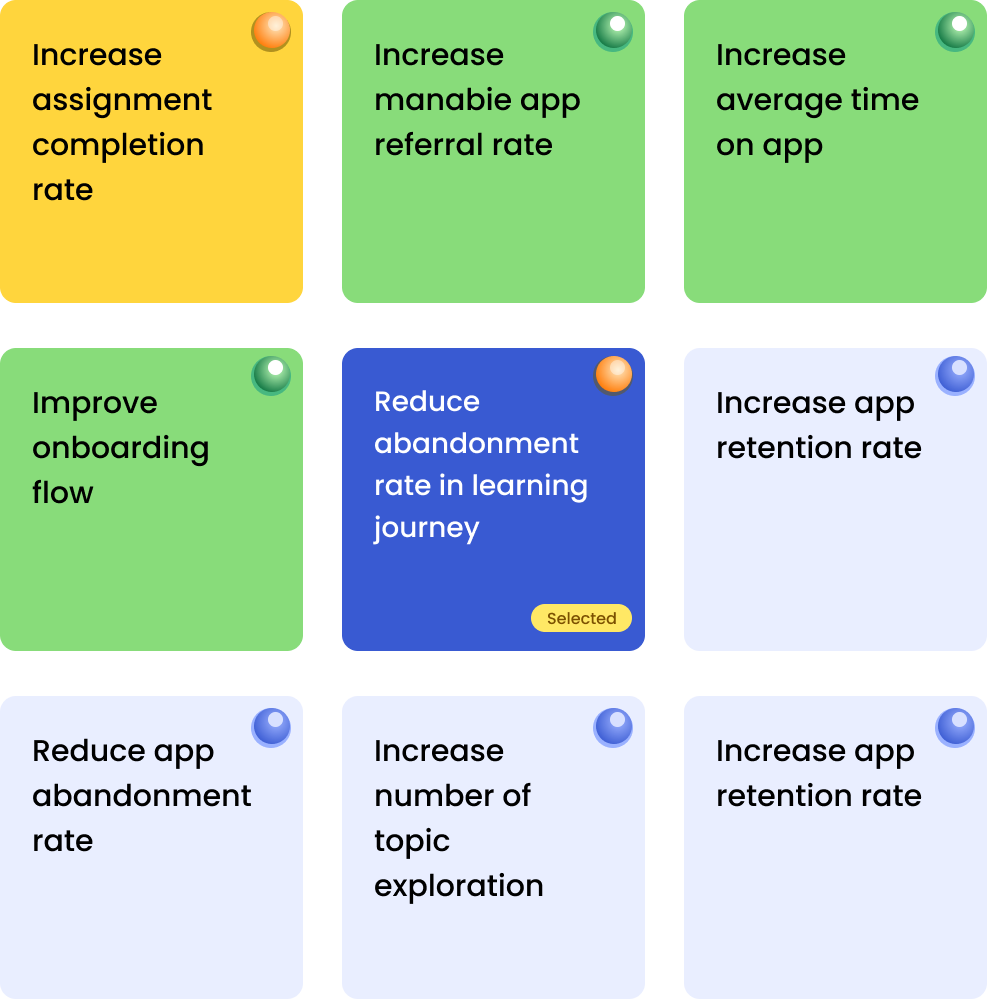
My approach to the Manabie product began with facilitating stakeholder meetings to gain clarity on the product vision, strategy, and competitive landscape. More importantly, I focused on understanding the business objectives to define success metrics for the app.

By the end of the meeting, we prioritized the key problems the business aimed to solve.

In this showcase, my focus is to address the critical issue of a 67.6% abandonment rate in Manabie's learning journey. The design approach aims to identify the problem, come up with solutions that enhance user engagement and improve user experience throughout the learning experience.

Explore now

Audit Product & Design Process

Method & Techniques
Review Documentation
Stakeholder Meeting
The first step in my design approach at Manabie was to audit the product and refine the design process. ​I began by downloading the app from Google Play and the Apple Store, exploring its features in the learning journey, and evaluating its performance and user interface.

Next, I defined the design process for the team, choosing Agile UX to enable effective collaboration between designers and developers. This choice aligned with the development team’s existing Agile/Scrum methodology.

Identify Problem Areas in Manabie's Learning Journey

The second step of my design approach was to analyse user data to address the problem via Google Analytics and Hotjar. I collaborated with a data scientist to examine user data and behaviors throughout the Manabie learning journey.

This analysis provided valuable insights which help me to define the root-cause problems of the product.

Explore Student Experience with Manabie

Through Interviews and Usability Test
To gain a deeper understanding of the users, I conducted user interviews, which is an efficient method for gathering insights. Focusing on improving the learning journey, my interview questions focused on users' experiences with the manabie's learning journey.​

The interviews were conducted in Manabie Office in 3 days on 10 students.​​

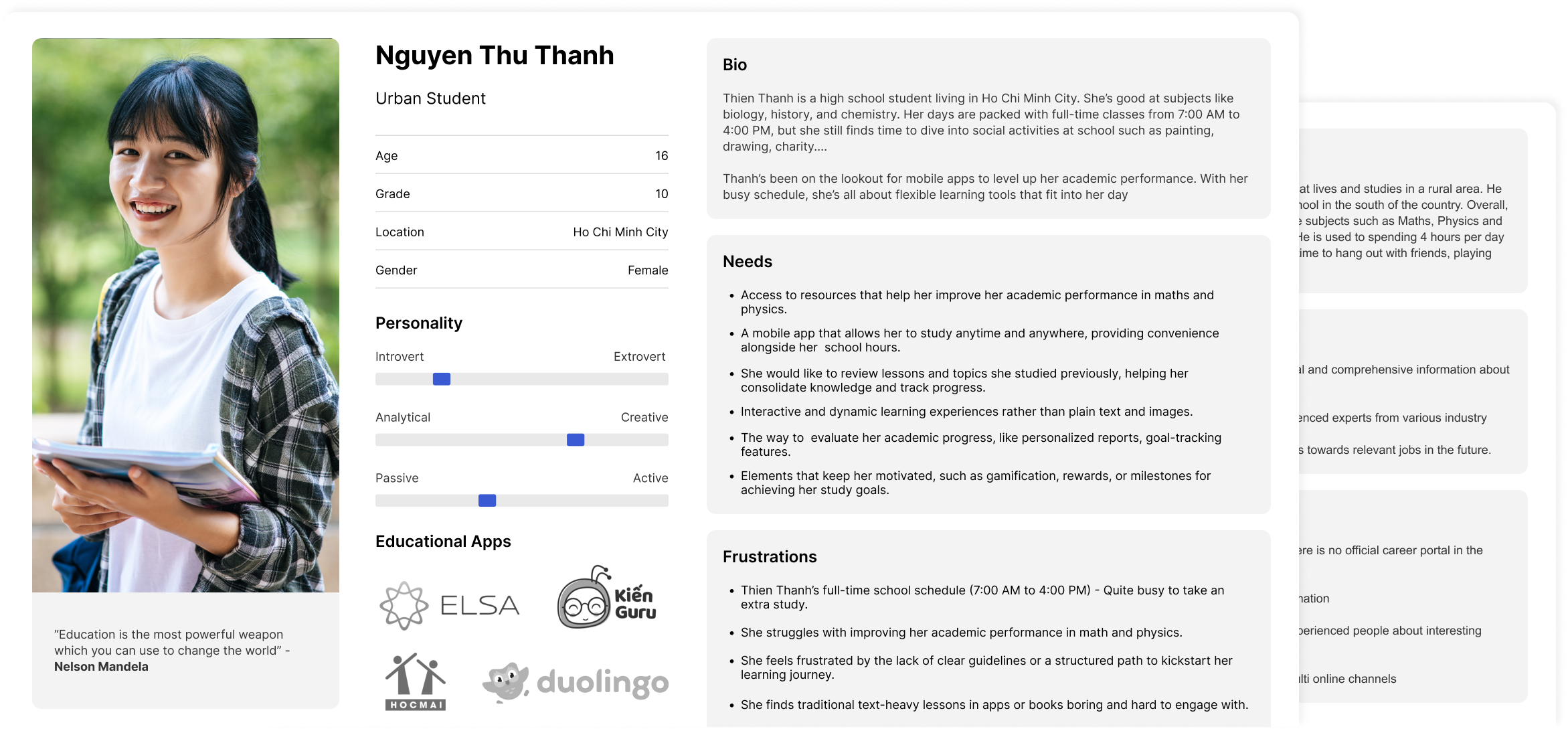
Based on the insights gathered from the user interviews, I developed two early personas to represent two groups of students: urban and rural students. By understanding the different behaviors and needs of each persona, I was able to tailor proper solutions for each persona.
Manabie User Interview
Early problems derived from interviews
Limited Time Availability
Struggles to fit extra study into a packed school schedule (7:00 AM–4:00 PM)
Lack of Clear Starting Point
Feels lost without structured guidance or a defined learning path.
Low Engagement with Traditional Content
Finds text-heavy lessons boring and hard to stay focused on.
Difficulty in Core Subjects
Needs targeted help in Maths and Physics but lacks confidence and direction.
Overwhelmed by Dual Workload
Balancing school assignments and app-based study feels chaotic and stressful.
Poor Visibility into Progress
Can't easily track academic improvement or see how her efforts are paying off.
No Personalized Feedback
Lacks tailored insights or recommendations based on her performance.
Missing Motivation Triggers
Needs gamified elements like rewards, milestones, or streaks to stay motivated.
Usability Test
To ensure Manabie delivers a seamless and effective learning experience, usability testing is conducted with real users who represent our target personas, Urban and Rural high school students.
Each session lasts approximately 40 minutes, during which participants are asked to complete two core tasks:

- Discover relevant subjects, topics, and lessons within the app.
- Progress through at least 40% of a learning journey, simulating real study behavior.

The sessions are moderated to observe how users interact with the app, where they encounter friction, and how intuitive the interface feels. Feedback is gathered through direct observation, task performance, and post-session interviews.

Conduct Heuristic Evaluation

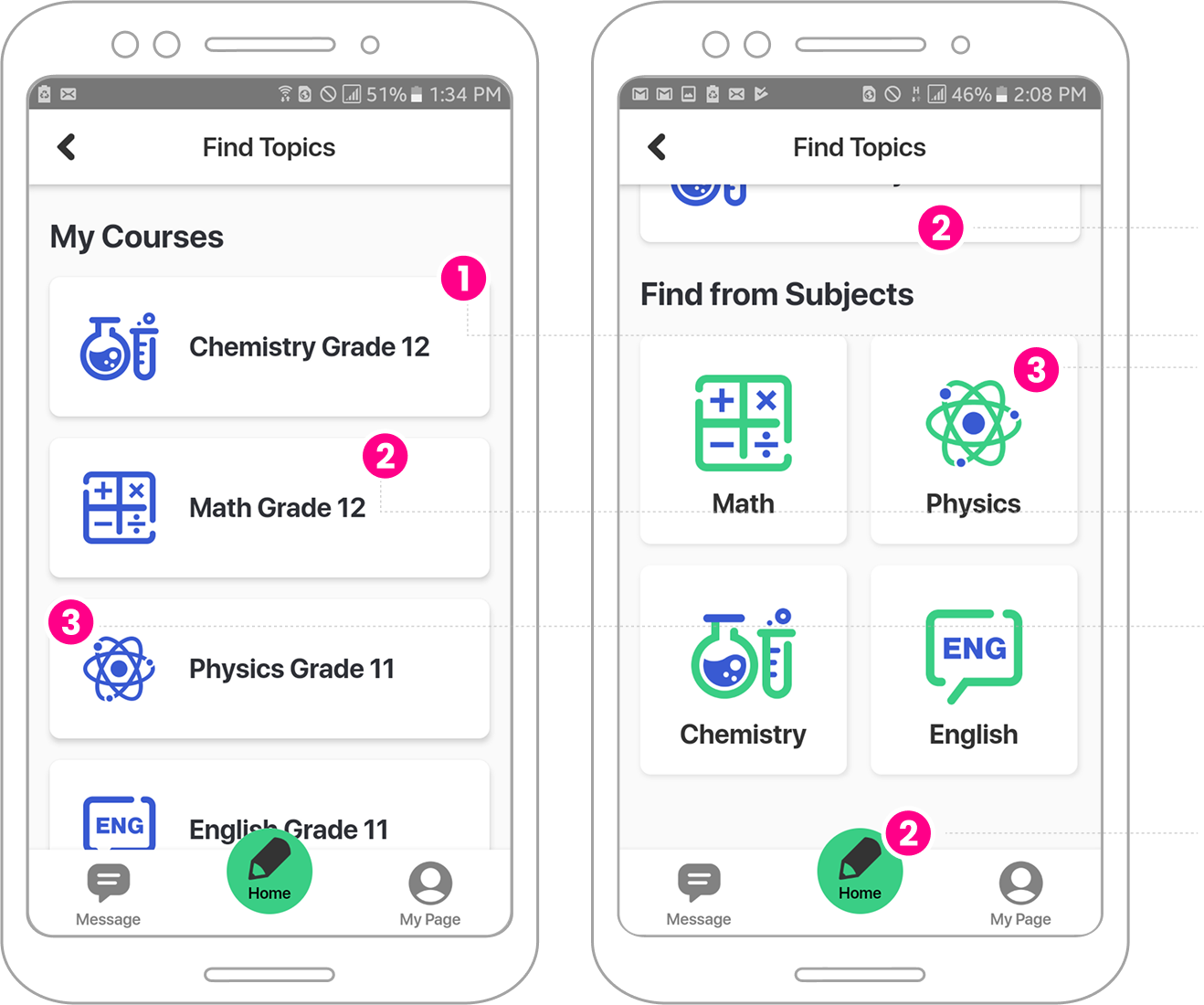
One of the most efficient design methods I applied in the early stage of my approach for the Manabie app was heuristic evaluation. This simple and effective method helped evaluate the usability of the current product and identify areas for improvement.​ I conducted the evaluation on 9 key screens on the learning journey.

Below is a sample of my evaluation findings.
Manabie Heuristic Evaluation
1
Visibility of system status
  • The course should display the users' learning progress status.
  • The UI should display the courses students have completed and those they have not.
  • The course card should show the number of topics as well as the number of lessons in the course.
  • The UI should indicate to the user which step of the learning journey they are currently on.
2
Match between the system and the real world
  • We should restructure the course list and update its naming convention, for example, changing "Math Grade 12" to "Course Name: Geometry and Dynamics, Grade: 12."
  • Reconsider the copy "Find from subjects"
  • We should consider changing the home icon, as the current pencil icon doesn't make it easy for users to understand its purpose.

Competitive Landscape Analysis

Using the list of competitors provided by stakeholders, I conducted a competitive landscape analysis. I started by downloading their apps to experience and observe their features.
I then consolidated my findings into a competitive analysis template, which allowed for a structured comparison and identification of key differentiators and opportunities for improvement.​

Define Problem: Synthesis & Analysis

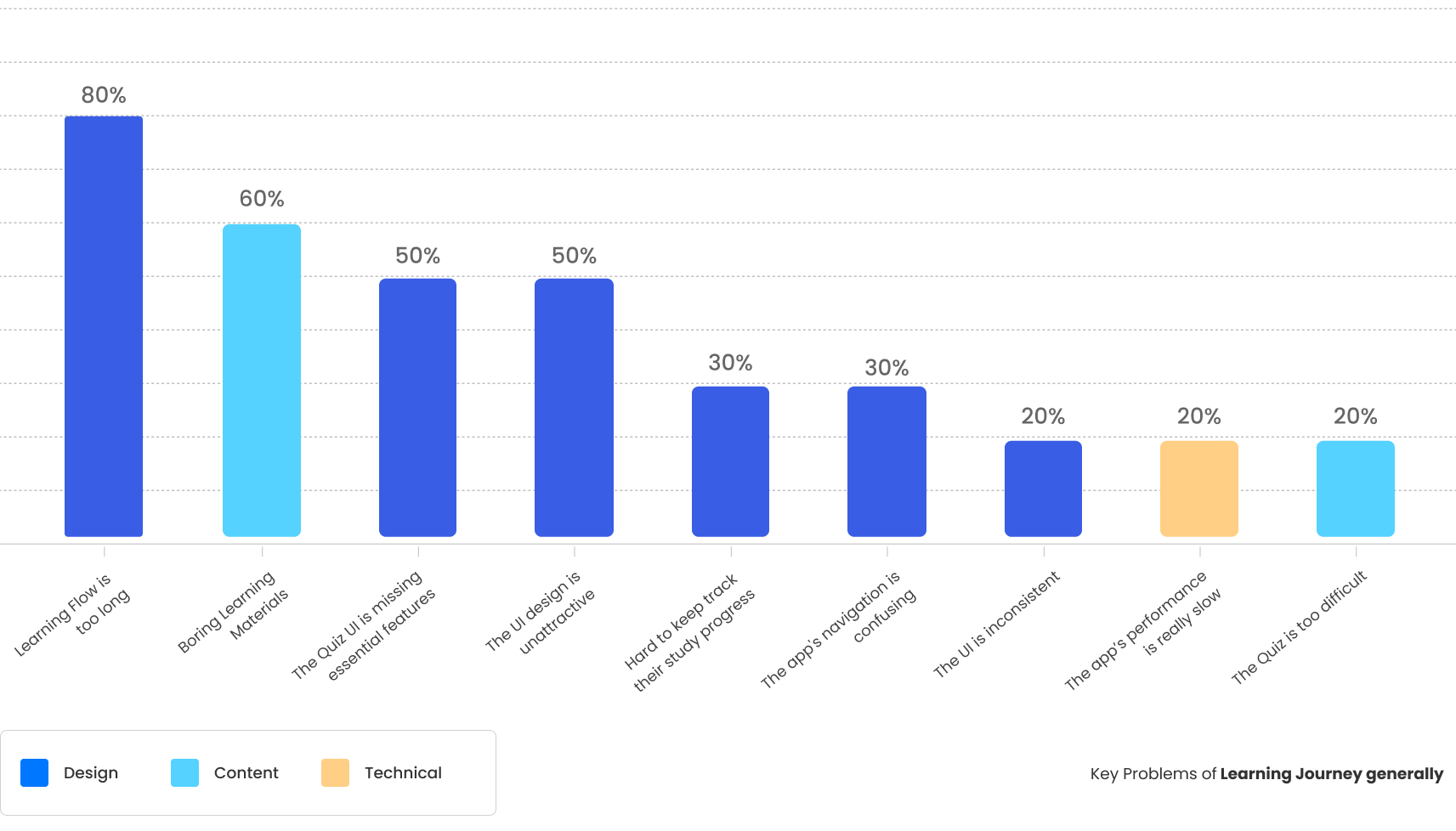
After conducting user research, I consolidated all user data into Excel sheets for synthesis. Using a simple grouping method, I organized similar information to identify patterns and common themes. To highlight the key problems, I visualized the findings using a bar chart, making it easier to prioritize issues and inform the next steps in the design process.​

The bar chart below illustrates the key issues in Manabie's learning journey, identified from the user interviews conducted in the previous stage.

Analyse Interfaces with POV Framework

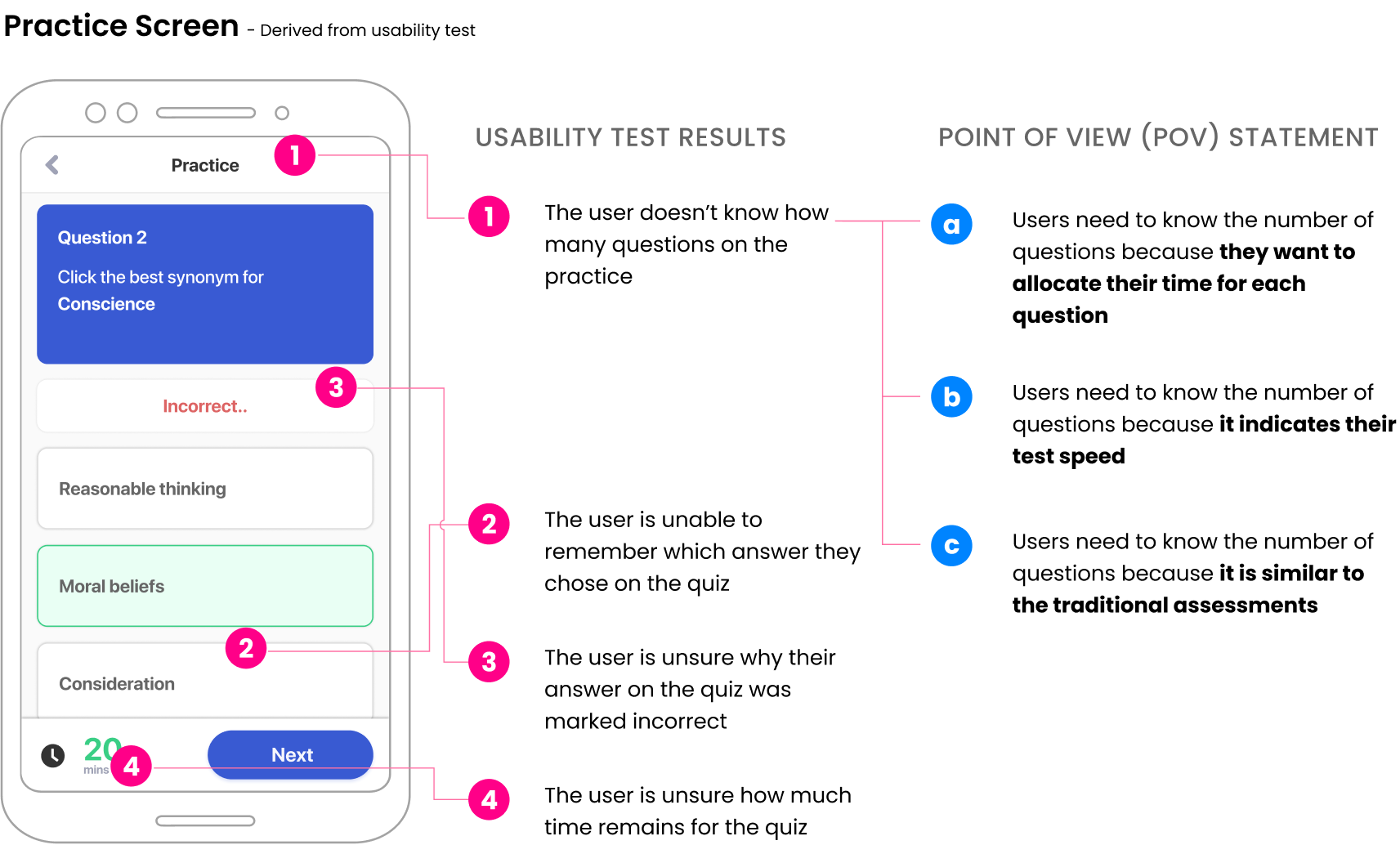
To define the root-cause problems for each screen in the learning journey, I analyzed user data gathered from usability tests and heuristic evaluations. Feedback was grouped by each mobile screen, allowing for targeted analysis.

By applying the "user point of view" statement method, I gained deeper insights into user pain points. This approach helped me identify relevant solutions to enhance the usability of each screen.

Facilitate Ideation Workshops

Method & Techniques
Group Brainstorming
Object-Oriented UX
Card-sorting
To solve the problems identified in the previous stage, I facilitated an ideation workshop with stakeholders. During the workshop, we applied various design methodologies, including card sorting, "How Might We" questions, and Object-Oriented User Experience (OOUX)...​
In the early stage, our solutions focus on solving 2 problems on the learning journey below.

80% - Learning Flow is too long
60% - Boring Learning Materials
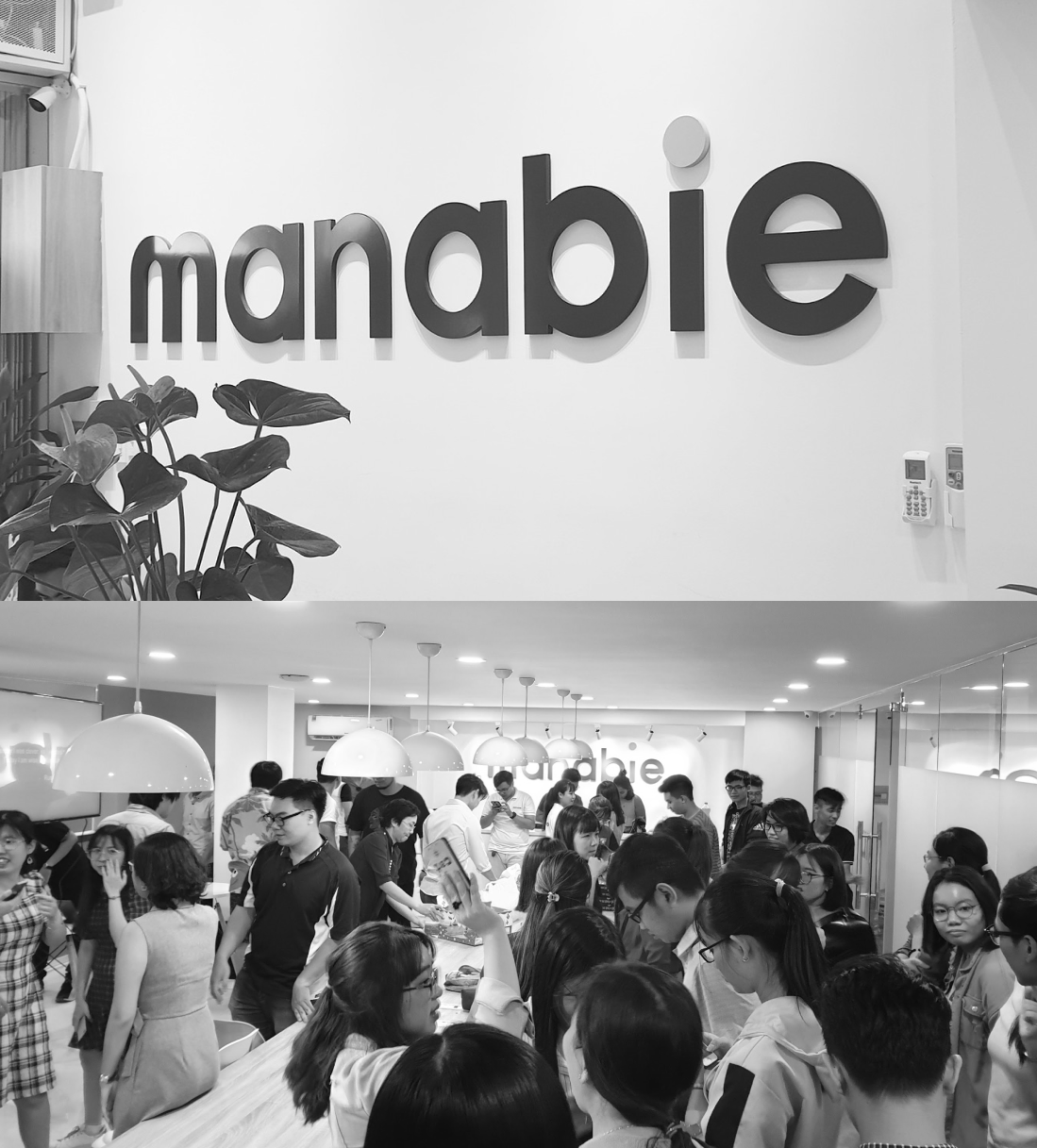
An ideation workshop in Manabie Office in Vietnam 2020

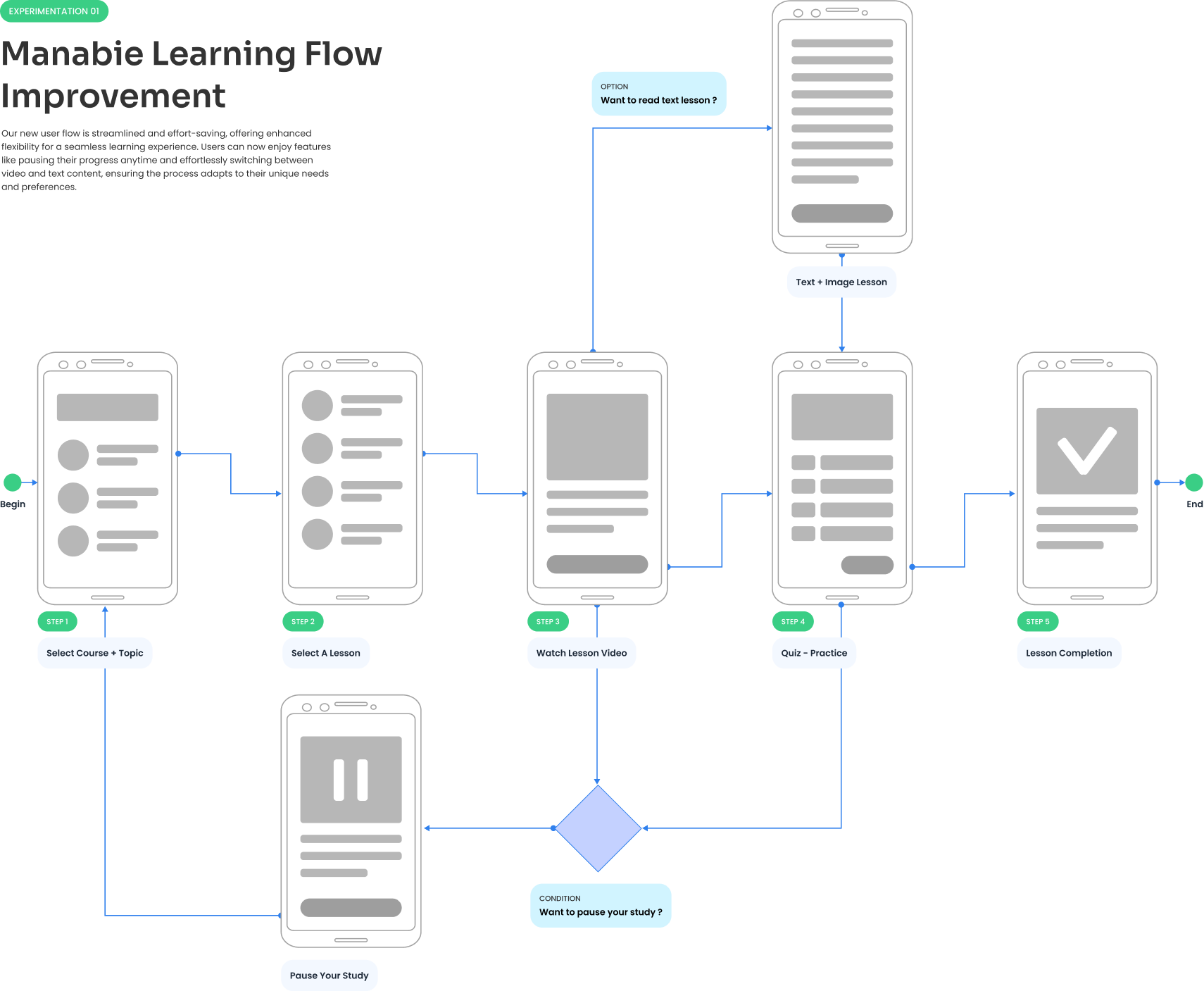
Experiment: Improve Learning Flow

To improve the learning flow of the Manabie app, I analyzed user insights and incorporated ideas derived from the ideation workshop. Based on this research, I developed a proposal for a new learning flow that better aligns with user needs and enhances the user experience below.

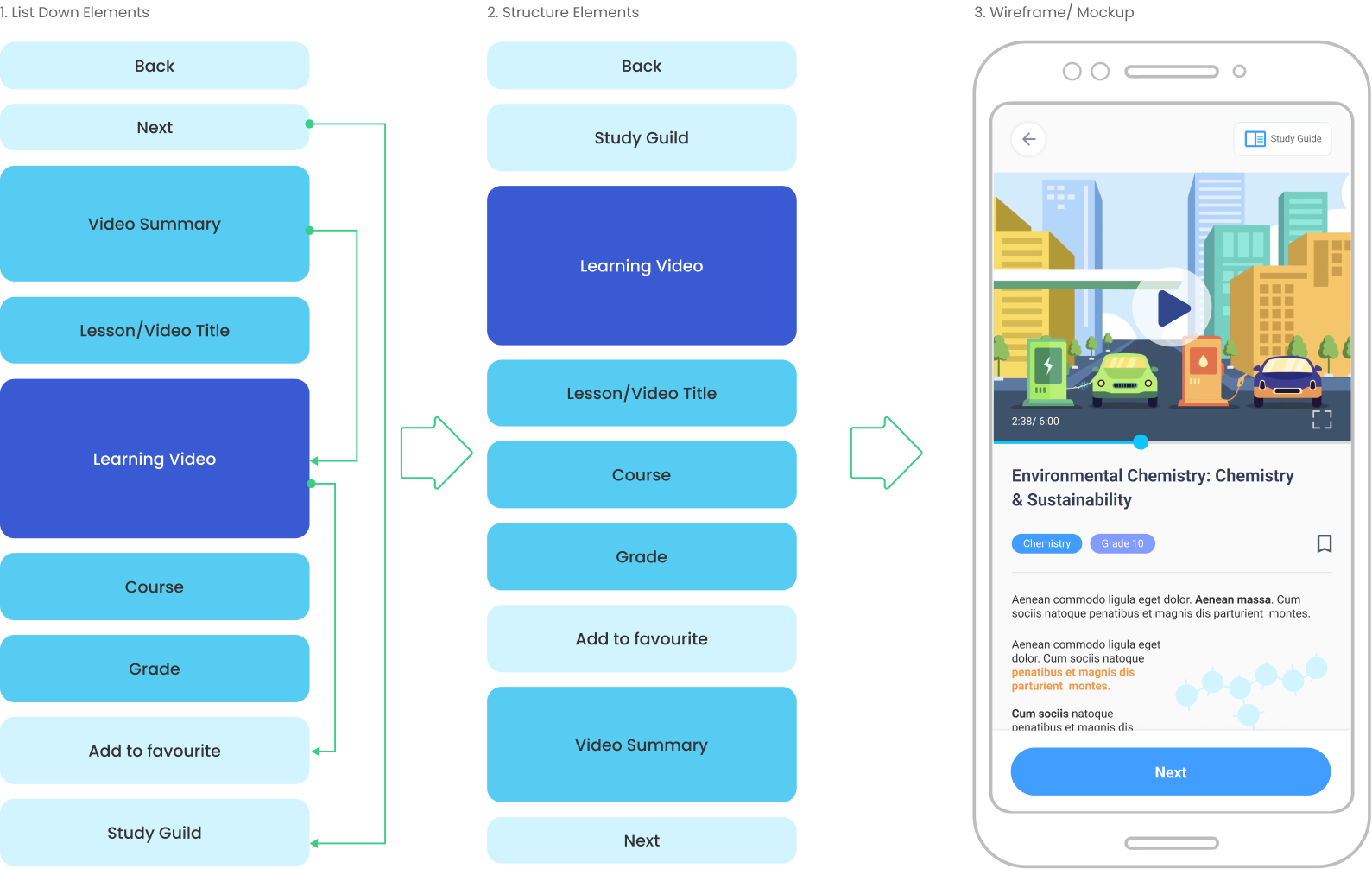
Improve Information Architecture with OOUX

Method & Techniques
Object Oriented UX
Card-Sorting
The first step in my design approach at Manabie was to audit the product and refine the design process. ​I began by downloading the app from Google Play and the Apple Store, exploring its features in the learning journey, and evaluating its performance and user interface.

Next, I defined the design process for the team, choosing Agile UX to enable effective collaboration between designers and developers. This choice aligned seamlessly with the development team’s existing Agile/Scrum methodology.

Improve Practice Screen

  • Show user's progress: inform users the total number of questions, display how many questions left.
  • Add "solution" below the correct answer: Brief explanation for the correct answer -> help students to understand answer, or rather, lesson efficiently.
  • Add "Pause" button: to allow users pause their practice -> Flexibility of learning.
  • Add "Time Remaining": inform users about their remaining time.
  • Relayout the screen: Maximise middle space to display the most important content
  • Add "Study Guide": Flexibility to review the lesson anywhere through the practice.
  • Clearly show user's choice/answer: Help users understanding and memorise lessons/questions better.

Improve The Academic Topics Screen

  • Add "Select Course": to allow users to navigate and find course quickly and easily
  • Display the number of topics and lessons: Show users the total number of topics and lessons on each course. Its help users to come up with relevant learning strategy.
  • Circle Progress Indicator: Using progress indicator to show students learning progress (in case of completion, using crown icon to clearly indicate completed topics)
  • Meaningful Icons: Using meaningful icon to improve users learnability and memorability.
  • Improve the consistency : make design more attractive, consistent and engage to users.

Improve Lesson Content Screen

  • Integrate Video Content: offer the video content to users, increase user engagement.
  • Integrate Lesson Summary: an enhancement for users to summary what they learnt from the lesson.
  • Add "Study Guide": Op Provide the flexibility to view both video and text content. It's also the way to evaluate the engagement and quality of content.
  • Integrate Pause functionality: Users can pause their study anytime. The resume study feature is displayed in many places in the app.
  • Bookmark Lesson: Allow students to bookmark their favourite lesson.

Enhance User Engagement with a Mascot

By introducing a friendly and relatable Mana - Mascot name, the app can create a more inviting and interactive experience for students. The mascot can serve as a guide, offering helpful tips, encouragement, and even challenges to keep users motivated and entertained as they navigate through the app's features.​

Additionally, the mascot can add a sense of personality and fun to the app, fostering a stronger connection between users and the platform.

New Design Proposal

The redesigned interface focuses on simplifying the user journey by consolidating the course and topic views into a single, cohesive layout. This eliminates unnecessary steps and reduces friction, allowing students to explore learning materials without confusion. The “select subject” feature, previously buried within nested menus, is now prominently placed on the home screen, making it instantly accessible and encouraging subject-based exploration from the outset.

Visual hierarchy and interaction patterns were refined to guide users intuitively, while maintaining consistency across screens. These enhancements not only improve usability but also foster a more engaging and efficient learning experience tailored to student needs.
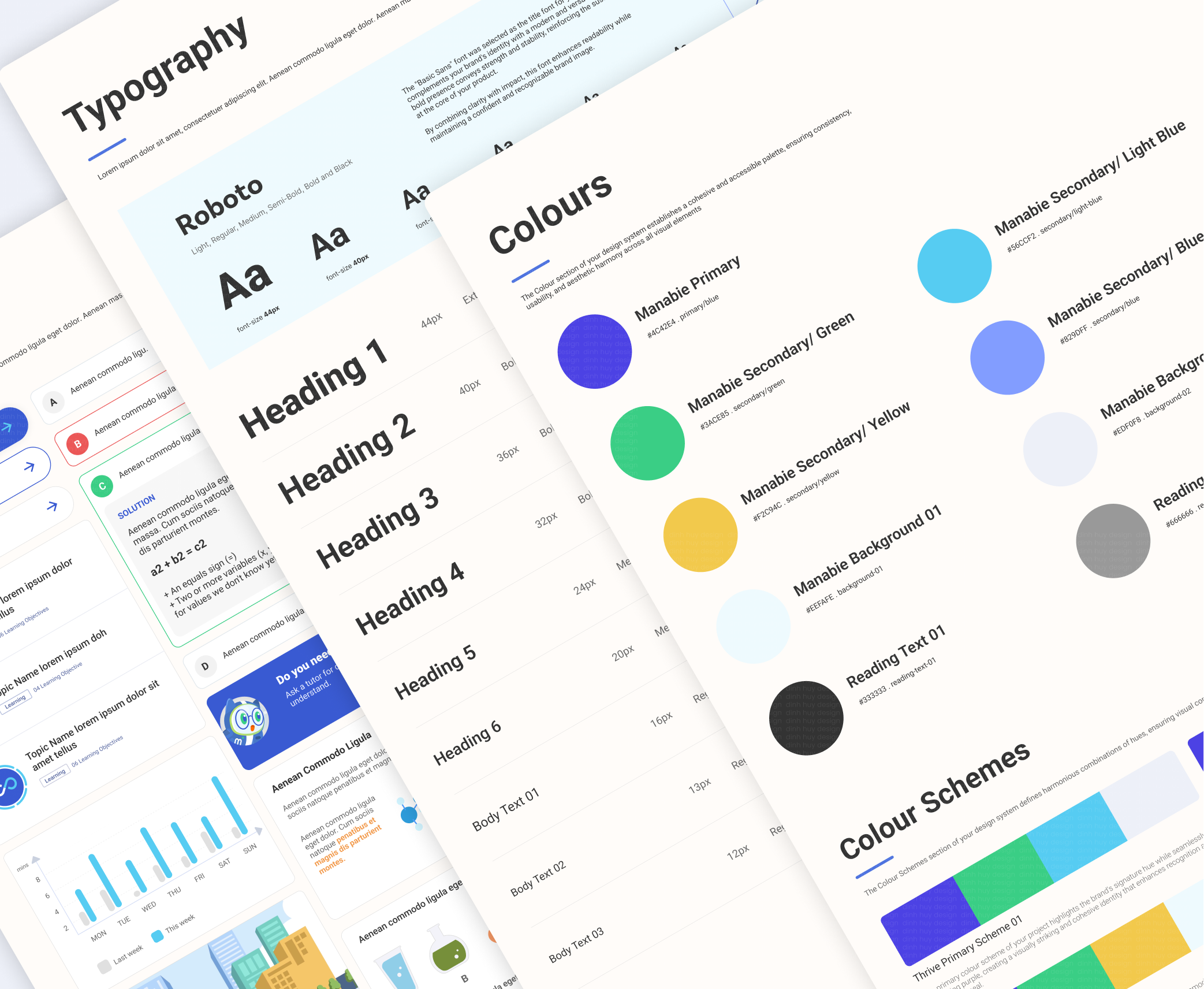
The new design system was crafted to bring consistency, clarity, and scalability across the Manabie platform. It introduces a refined visual language with updated typography, color palette, and spacing rules that enhance readability and reduce cognitive load. Components were rebuilt with accessibility in mind, ensuring that buttons, forms, and interactive elements meet usability standards across devices. A modular approach was adopted for UI elements, allowing for faster iteration and easier maintenance as the product evolves.

The Impacts of My Solution

The redesigned experience led to a significant drop in user abandonment, with the drop-off rate decreasing from 67.6% to 38.2%. This improvement reflects enhanced usability and stronger engagement, validating the effectiveness of the proposed design changes.
Reduce the abandonment rate to 38.2%
Reducing the abandonment rate by 29.4%, bringing it down from 67.6% to 38.2%. This significant reduction highlights the effectiveness of my design solution on the manabie learning journey.
Time on the Lesson Video Screen doubled
There has been a remarkable 200% increase in users' time spent on the lesson video screen, indicating a higher level of engagement and satisfaction.
Students learn more: 4 lessons instead 2 lessons
The number of lessons students learn weekly has seen a rise, +2 additional lessons compared to the previous version. This indicates that the enhancements have made the learning experience more effective.
User Satisfaction from 30% to Over 56.5%
This improvement also significantly enhanced the Manabie Learning App, boosting user satisfaction from 35% to an impressive 52.5%
Assignment Completion Rate increases by 9.2%
By implementing these solutions, I increased the assignment completion rate by 9.2%, enhancing user engagement and academic productivity.

My Further Achievements at Manabie

During my three years as Product Design Manager at Manabie, I built and led a design team, establishing strong processes and a collaborative culture. I also supported fundraising efforts that secured $41 millions.
06
Designers
Make a high-impact design team at Manabie
I grew the design team from 1 designer to 6, form the design processes, build a strong team culture, and promoting seamless collaboration, which greatly contributed to the overall success of our projects.
$41
millions
Securing $41 millions in investment
I played a key role in supporting Manabie’s fundraising, successfully securing $41 million in investment from over 10 investors - foundation for our growth and development.

Reflections

This project was a deep dive into designing for meaningful engagement and consistency. It challenged me to think beyond features and focus on how students and teachers actually interact with the product. A few key takeaways below:
Early alignment is everything
Getting stakeholders involved early through design reviews helped prevent scope creep and last-minute pivots.
Small usability wins add up
Even minor UX refinements (like progress indicators or simplified navigation labels) had measurable impact on completion rates.
Quantitative + qualitative data
together tell a stronger story. Usage analytics validated what we heard in interviews and helped prioritize next iterations.
Contact

Let’s Talk & Collaborate

I’m always excited to collaborate and exchange ideas! If you're passionate about design and eager to connect, feel free to reach out.

Let’s create, innovate, and inspire together!
(+44)-749-864-8205 or (+84)-363-720-448
I have worked on
40+
Design Projects
20+
Brands & Companies
Thank you!
Your submission has been received!
Oops! Something went wrong while submitting the form.
Manabie
E-Learning App: Total Education